![logo_2x.png]](https://support.facsware.com/hs-fs/hubfs/FACS_January_2020/Images/logo_2x.png?height=40&name=logo_2x.png)
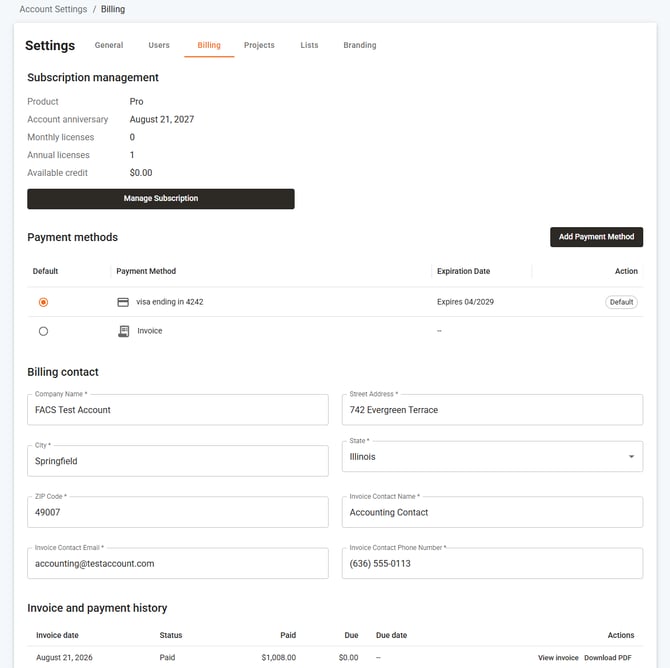
Subscription Management
The top section displays your current account product, anniversary date, license count, and available credits (if any). Using the Manage Subscription button, users can purchase additional annual licenses (up to the number of current monthly licensed users) and add-on services such as extra Training or Onboarding sessions.
Payment Methods
Additional payment methods can be added via the Add Payment Method option, and a default method can be selected. Whenever a charge is incurred, the system uses the current default payment method to process it.
Billing Contact
The billing contact information shown here is what displays on invoices and receipts sent by the system. The invoicing contact email address is where all invoices and receipts are sent.
Note: Users with the Billing Role have access to this area as well as Account Settings > Users, where they can manage which users are active in the system. However, only the Invoice Contact Email will receive email notifications for invoices and receipts.
Invoice and Payment History
All previous and current invoices can be viewed — and paid — in the bottom section. Click View Invoice to view a paid invoice, or Pay Invoice to pay an open or past due invoice.
Location
Account Settings > Billing
If you have any questions, or need additional assistance, please reach out to our support team at support@facsware.com and we will be happy to assist you.